
AI Photo Retouching
Ready for Generating
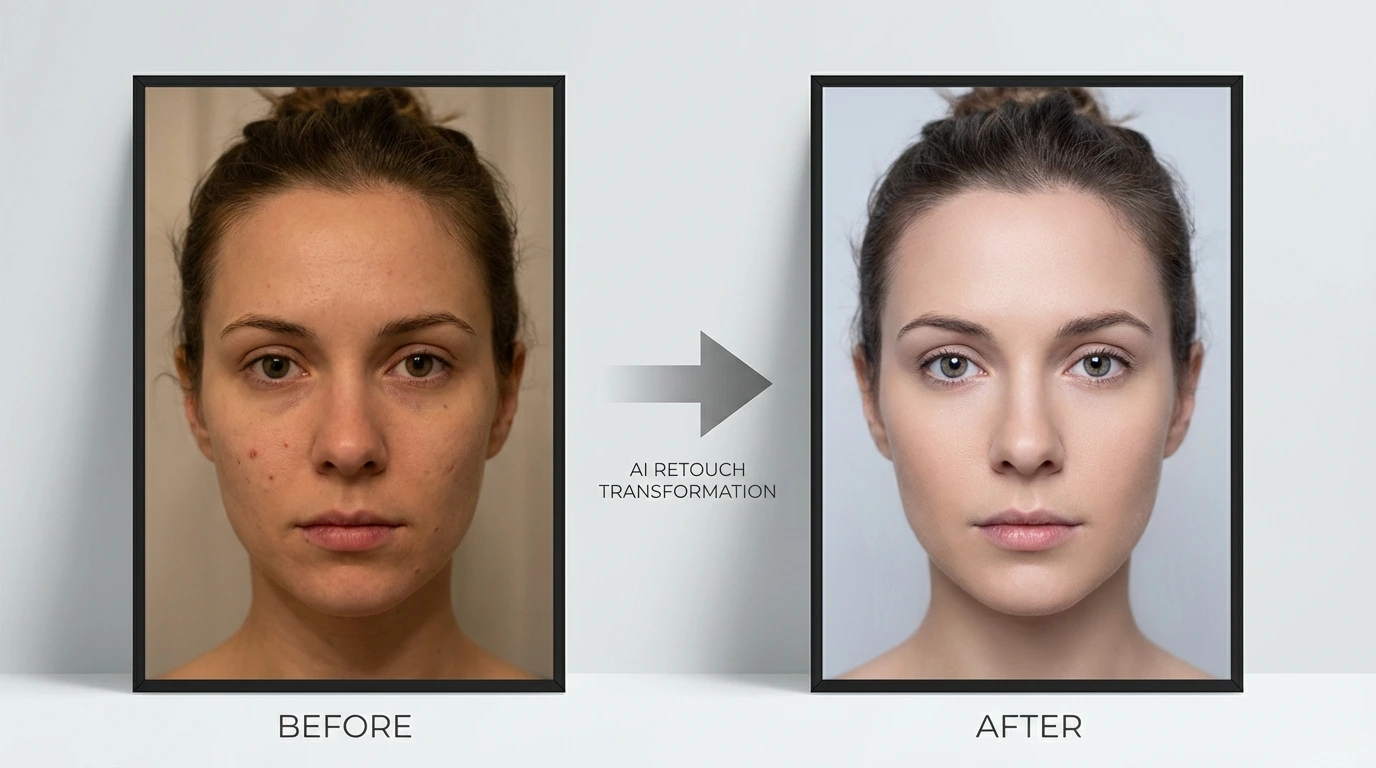
How AI Photo Retouching Works
Our AI Photo Retouching tool analyzes your images, detects imperfections, and applies professional-grade enhancements automatically.
Intelligent Skin Analysis
The AI Photo Retouching tool scans your image to detect skin texture, blemishes, wrinkles, and uneven tones. It understands the difference between natural skin features and imperfections, ensuring retouching looks natural and not over-processed.
Automatic Enhancement
Once analyzed, the AI Photo Retouching tool smooths skin, removes blemishes, whitens teeth, brightens eyes, and balances lighting. Each enhancement is applied with precision using deep learning models trained on professional retouching workflows.
Detail Preservation
The AI Photo Retouching tool preserves the original resolution, natural skin texture, and fine details of your image. Hair strands, pores, and subtle features remain intact while imperfections are seamlessly removed for a polished yet realistic result.
Why Choose Our AI Photo Retouching Tool
Professional photo retouching powered by AI — fast, accurate, and effortless.
Professional Results in Seconds
Get studio-quality retouching without spending hours in Photoshop. The AI Photo Retouching tool delivers professional results instantly, saving you time and effort on every photo.
Natural-Looking Enhancements
Unlike heavy filters, the AI Photo Retouching tool applies subtle, natural enhancements. Skin looks smooth but real, lighting is balanced but not artificial, and every detail is refined without looking over-edited.
Works on Any Photo Type
Whether it's a portrait, group photo, selfie, or professional headshot, the AI Photo Retouching tool adapts to any image type. It handles different skin tones, lighting conditions, and photo styles with equal precision.
No Skills Required
You don't need any photo editing experience. Simply upload your image and the AI Photo Retouching tool handles everything automatically. Perfect for photographers, content creators, and anyone who wants better-looking photos.
How to Use AI Photo Retouching
Retouch your photos in three simple steps.

Upload Your Photo
Select and upload the photo you want to retouch. The AI Photo Retouching tool supports JPG, PNG, and WEBP formats up to 10MB.

AI Retouching
The AI Photo Retouching tool automatically analyzes your image and applies professional retouching — smoothing skin, removing blemishes, enhancing lighting, and refining details.

Download Your Retouched Photo
Preview the retouched result and download your enhanced photo. The output maintains the original resolution and format.
What Users Say About AI Photo Retouching
Thousands of users trust our AI Photo Retouching tool for professional-quality results.
This AI Photo Retouching tool has cut my editing time in half. The skin smoothing is incredibly natural — my clients can't tell it's AI-enhanced.
Sarah M., Portrait Photographer
Sarah M.
Portrait Photographer
I use the AI Photo Retouching tool for all my social media photos. It makes every selfie look professional without that over-filtered look.
James L., Content Creator
James L.
Content Creator
Processing hundreds of wedding photos used to take days. With AI Photo Retouching, I can deliver polished results to clients much faster.
Emily R., Wedding Photographer
Emily R.
Wedding Photographer
Our product photos and team headshots look so much more professional now. The AI Photo Retouching tool is a game-changer for our brand image.
David K., E-commerce Manager
David K.
E-commerce Manager
Finally, a retouching tool that doesn't make me look fake. The AI Photo Retouching keeps my natural features while making everything look polished.
Lisa T., Influencer
Lisa T.
Influencer
I use AI Photo Retouching for my professional headshots and listing photos. The quality improvement is remarkable and it's so easy to use.
Michael W., Real Estate Agent
Michael W.
Real Estate Agent
AI Photo Retouching FAQ
Common questions about our AI Photo Retouching tool.
Try AI Photo Retouching — Free to Start
Upload a photo and the AI Photo Retouching tool delivers a professionally retouched result in seconds. No signup needed for your first retouch.