
AI Object Remover
Ready for Generating
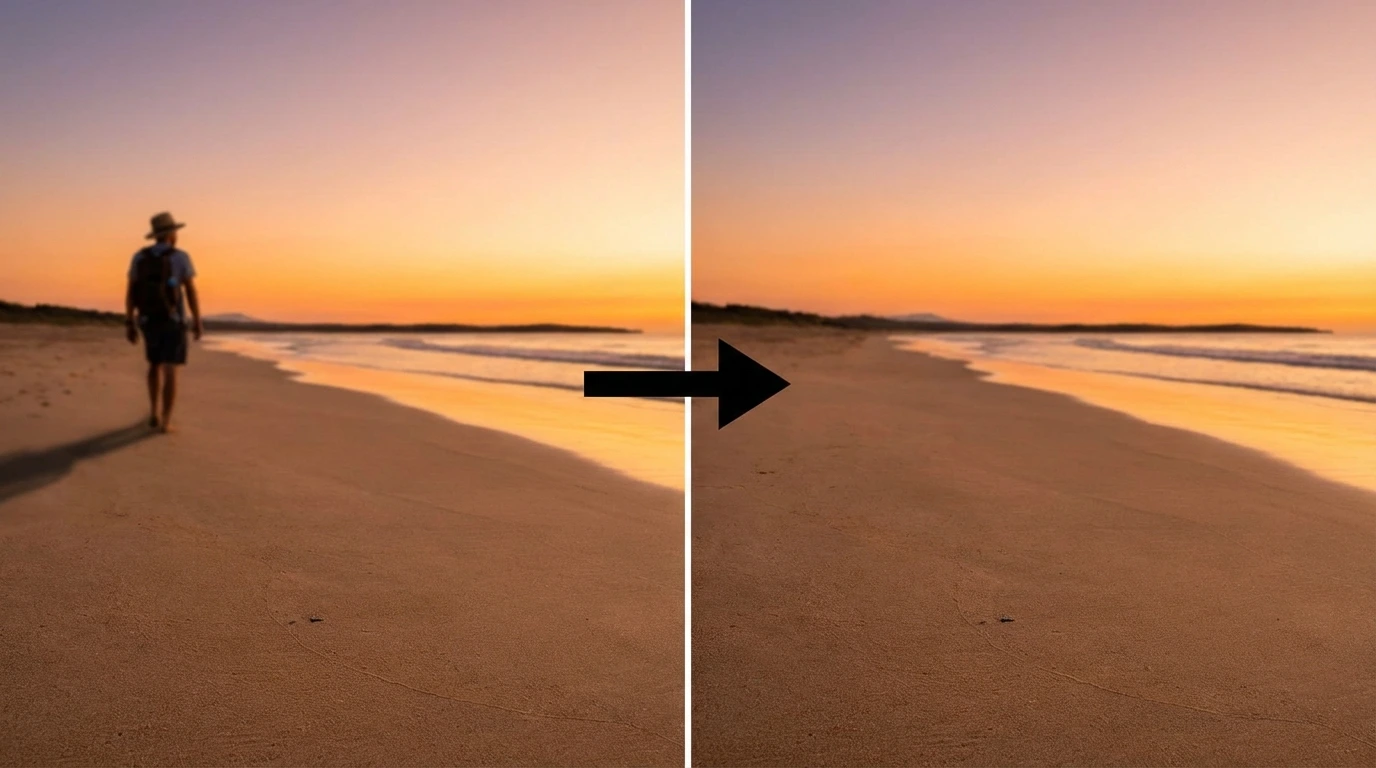
How AI Object Removal Works
Our AI Object Remover analyzes the selected region, understands surrounding context, and fills in the removed area naturally using advanced inpainting technology.
Select Objects with Brush Tool
Use our intuitive AI Object Remover brush tool to paint over any unwanted objects, people, or items in your photo. Adjust brush size for precise selection. The AI Object Remover gives you complete control over what to remove with our advanced AI Object Remover technology.
AI Inpainting and Reconstruction
Once you've selected the objects to remove, the AI Object Remover analyzes surrounding pixels, textures, colors, and patterns. It reconstructs the area where the object was, filling it in naturally so it blends seamlessly with the background.
Perfect Background Blending
The AI Object Remover ensures the removed area matches the surrounding background perfectly. Whether it's grass, sky, pavement, or complex textures, the result looks natural and unedited. No visible seams or artifacts.
Why Use Our AI Object Remover
A powerful AI Object Remover designed to eliminate unwanted elements from your photos effortlessly.
Remove Anything from Photos
The AI Object Remover can erase people, vehicles, signs, trash cans, power lines, tourists, photobombers, and any other unwanted items. Our AI Object Remover works on both simple and complex objects with varying shapes and sizes, making it the most versatile AI Object Remover available.
Precision Brush Control
Adjustable brush size lets you select tiny details or large areas with ease. The AI Object Remover brush tool supports both mouse and touch input, making our AI Object Remover simple and accurate on any device for precise object selection.
Natural Background Fill
Unlike simple clone tools, the AI Object Remover understands context. It reconstructs backgrounds intelligently, matching grass patterns, continuing pavement lines, and extending skies naturally without repetitive patches.
Undo and Refine
Made a mistake? Use the undo button to remove the last brush stroke, or clear the entire selection and start over. Refine your selection until you're happy with exactly what will be removed.
Preserves Image Quality
The AI Object Remover maintains your photo's original resolution and quality. Only the selected area is modified—the rest remains pixel-perfect. The final result looks professional and natural.
Works on Mobile and Desktop
The AI Object Remover's brush tool supports both mouse and touch input. Remove objects from photos on your phone, tablet, or computer with the same ease and accuracy.
Remove Objects in 3 Simple Steps
Clean up your photos quickly with our intuitive AI Object Remover tool.
Upload Your Photo
Drag and drop or click to upload the image you want to clean up with our AI Object Remover. Supports JPG, PNG, and WEBP formats up to 10MB. Your photo loads instantly in the AI Object Remover editor.
Paint Over Unwanted Objects
Use the brush tool to paint over anything you want to remove—people, items, signs, or any distractions. Adjust brush size for precision. Use undo if you need to refine your selection.
Download Clean Photo
Click 'Generate' and the AI Object Remover removes the selected objects in seconds. Preview the result and download your cleaned photo in full resolution with the objects completely erased by our powerful AI Object Remover.
What Users Say About the AI Object Remover
Real feedback from people using our AI Object Remover tool.
I use this AI Object Remover to clean up tourist-heavy photos. The AI Object Remover removes random people from my travel shots and fills in the background perfectly. My photos look so much better now with this AI Object Remover tool.
Jessica P., Travel Blogger
Jessica P.
Travel Blogger
Perfect for removing cars, trash cans, and other eyesores from property photos. The brush tool makes selection easy and the results look completely natural. Saves hours of manual editing.
Michael H., Real Estate Photographer
Michael H.
Real Estate Photographer
I had a beautiful ceremony photo with a random person in the background. This tool removed them cleanly and you'd never know they were there. The background reconstruction is impressive.
Amanda C., Wedding Photographer
Amanda C.
Wedding Photographer
Great for cleaning up product shots. I can remove unwanted reflections, shadows, and props without spending time in Photoshop. The brush tool gives precise control over what to erase.
Ryan D., Product Photographer
Ryan D.
Product Photographer
I removed power lines from my outdoor photos and the sky filled in seamlessly. The AI actually understands what should be there instead of the object. Results look professional every time.
Sophia L., Content Creator
Sophia L.
Content Creator
We process tons of user-submitted photos for campaigns. This AI Object Remover cleans them up fast—removing logos, watermarks, and unwanted items in seconds. The AI Object Remover quality stays perfect throughout every edit.
Daniel K., Social Media Manager
Daniel K.
Social Media Manager
Frequently Asked Questions
Common questions about using the AI Object Remover tool.
Try the AI Object Remover — Free to Start
Upload a photo, select unwanted objects with the brush tool, and the AI erases them in seconds. No signup needed for your first removal.